Content and platform skills
Learn content strategy, captions, Canva designs, short-video planning, publishing, community management and reporting.
 Free demo
Connect websites, search, ads, analytics and AI with practical projects.
Explore the curriculum Explore the main courseExplore the free career assessment, then discuss your learning goals with the team.
Take the free assessmentAsk about the syllabus, trainer, learning mode and available batches before you enrol.
Contact the instituteLearn to plan content, create posts and short videos, manage conversations and understand the results. Build practical social media skills across Instagram, Facebook, LinkedIn and YouTube at Impact Digital Marketing Institute.

Review the essentials before choosing social media training in Hyderabad.
Learn content strategy, captions, Canva designs, short-video planning, publishing, community management and reporting.
Build a profile audit, content calendar, sample posts, Reel scripts, response guide and performance-review report.
Choose online or classroom learning with the same specialist fee. Start with basic computer skills and time for practice.
Recordings for one year after completion. Placement assistance for one year from enrolment.
Telugu, English and Hindi learning options · Course Completion Certificate · Relevant third-party certification guidance
Move from posting at random to planning content with an audience and purpose.
Social media marketing brings together the audience, message, creative format and conversation around a business. A useful post answers a question, explains an offer or helps someone take the next step. The work continues after publication through responses and review.
Our Social Media Marketing Training in Hyderabad starts with the business goal. Learn to choose relevant platforms, plan content themes, write captions and prepare visuals. Practise organising a calendar, responding to common enquiries and reviewing platform insights.
This specialist course focuses on social media skills. For website building, SEO, Google Ads, analytics and a broader marketing foundation, compare our Digital Marketing Course in Hyderabad. The wider programme has separate duration, fees and benefits.
Ask who the post serves, what they should understand and what next step makes sense. Choose a format that supports the message.
Comments and messages are part of the customer experience. Learn clear responses, escalation and a consistent brand voice.
Understand the idea first. Then use a guide or template at your own pace.
Plan useful posts with a simple example.
Open free guide →Explain an offer in easy words.
Open free guide →Explain a practice project you can show.
Open free guide →You can begin with basic computer skills. You do not need an existing audience or professional marketing experience.
Understand the tasks behind a social media role. Create sample work and practise explaining your content decisions in interviews.
Organise platform work around a goal. Improve content briefs, publishing workflows, community responses and performance reviews.
Learn to plan a business profile and content calendar. Understand how to brief a designer, review posts and communicate the scope of a social media service.
If you are comparing SMM training in Hyderabad, ask about practical outputs, trainer experience, platform coverage and support periods. Followers are not a prerequisite for joining.
Each skill connects with a practical task rather than a list of platform features.
Research customer questions and relevant themes. Write a clear brand brief and decide what the profile should communicate.
Use a suitable hook, clear message and relevant next step. Adapt the tone and format for the platform and business.
Create Canva layouts, carousel outlines and Reel or Shorts scripts. Review mobile readability and the flow of the message.
Build a calendar with formats, owners and approvals. Prepare captions, assets and links before scheduling.
Use a response guide, protect private details and know when to pass a question to the right person.
Read platform insights and connect them with the goal. Identify useful observations and a specific change to test next.
Our Social Media Marketing Training in Hyderabad covers the decisions and everyday tasks behind useful social content. Open each module to see the topics and output.
Start with the business, customer and purpose of the profile. Learn how organic content, community work and paid promotion play different roles. Identify a realistic objective and the information a customer needs. Build a brand voice guide so captions and responses feel consistent across the team.
Practical output: A social media brief defining the audience, goal, content themes and tone.
Review what a visitor sees when opening a business profile. Check the name, bio, contact options, links and visual consistency. Compare Instagram, Facebook, LinkedIn and YouTube with the audience and available content resources. Learn access and security basics before managing an account or Page for someone else.
Practical output: A profile audit with a prioritised list of improvements.
Gather ideas from real questions, business offers and relevant industry conversations. Turn these into content themes with a useful mix of formats. Prepare a calendar that includes the message, format, owner, deadline and next step. Discuss approvals and coordination so content does not get published with missing details.
Practical output: A four-week sample calendar with briefs and publishing responsibilities.
Write captions that explain the point clearly. Practise a hook, a short body and an appropriate call to action. Plan image posts and carousels in Canva using consistent colours, typography and spacing. Review mobile readability, accessible text and the connection between the visual and caption.
Practical output: Sample captions, a carousel outline and a small set of post designs.
If you are looking for an Instagram marketing course in Hyderabad, this module connects profile planning with practical content work. Compare the purpose of posts, carousels, Stories and Reels. Develop a short-video idea, script and shot list. Review available insights and learn to improve the next piece of content using evidence.
Practical output: An Instagram content plan with a Reel script and Story sequence.
Explore how a business Page supports information, content and customer conversations. Plan useful posts and understand publishing or scheduling options available to the account. Prepare a response guide for common enquiries and comments. Review permissions, privacy and escalation rather than treating every message as something to answer publicly.
Practical output: A Facebook Page content plan and a community response guide.
Understand the difference between a personal professional profile and a company Page. Write posts around relevant expertise, questions and business context. Plan useful professional content without copying an Instagram caption into every platform. Review available Page analytics and explain what the engagement figures can and cannot tell you.
Practical output: A LinkedIn content brief and sample professional posts.
Plan videos around audience questions and a clear purpose. Practise titles, thumbnail ideas, descriptions and a simple video outline. Compare a longer explanation with a Shorts idea. Use YouTube Studio concepts to understand reach, engagement and audience retention. Review where viewers lose interest before proposing a change.
Practical output: A video outline, thumbnail brief and a Shorts script.
Set a reporting question before collecting screenshots. Review reach, impressions, engagement, profile activity and available customer actions. Separate organic activity from paid promotion and understand why metrics differ across platforms. Learn the role of a promotion brief and when specialist Ads knowledge is needed.
Practical output: A social media review report with observations and next actions.
Use AI to organise content ideas, draft alternatives or adapt a brief. Check facts, tone, ownership and the context before using a draft. Organise your own calendar, designs, scripts and report into a portfolio. Practise explaining the goal, your contribution and the reason for each content decision.
Practical output: An edited AI-assisted draft and a portfolio presentation of your practical work.
Platforms and available features change. Lessons use the tools available for the batch. For the wider programme, explore the full digital marketing syllabus.
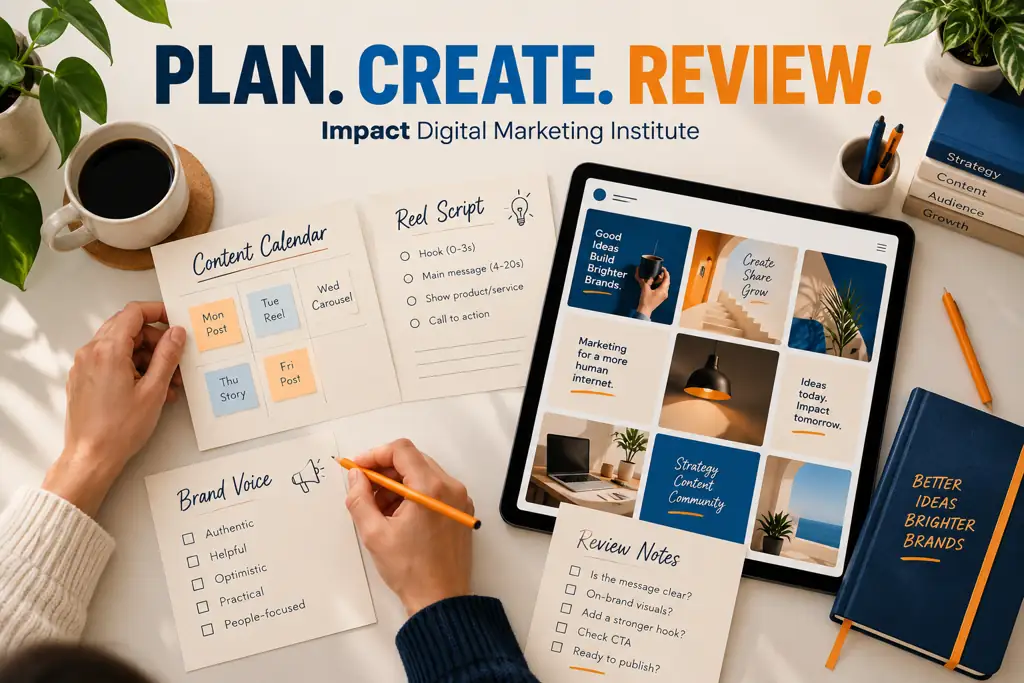
Show the thinking behind a post, calendar or content review.
Practical work in our Social Media Marketing Training in Hyderabad connects the business brief with the audience, format and message. Save the first draft, trainer feedback and your changes so you can explain how the work developed.
Label the work you completed. In a shared exercise, distinguish your captions, designs or analysis from other people’s contributions.
Check image, music and footage rights before publication. Keep client information private and obtain approval before posting to a business account.
Label sample calendars and practice data. A designed portfolio piece demonstrates your approach; it is not automatically evidence of business results.
Use a simple process to keep the message, design and next step connected.
Choose a real customer question or business message. Note who the post is for, what it should explain and which format suits it.
Write the caption and prepare the visual. Check facts, readability, brand voice, asset rights and the destination link.
Follow the approval process, respond to relevant comments and review the available insights. Record one useful change for the next post.
A consistent brand voice does not mean publishing the same content everywhere.
Plan visual posts, carousels, Reels and Stories. Connect the format with the audience and the point you want to communicate.
Organise Page information, content and community responses. Give customers a clear route for questions and relevant next steps.
Develop professional content with useful context. Match the message to the purpose of a profile or company Page.
Plan explanations and short videos around audience questions. Review video structure, titles, thumbnails and retention concepts.
Connect the report with the purpose of the post rather than collecting numbers without a question.
Look at who saw the content and how it was discovered where the platform provides this information. Distinguish visibility from a useful customer action.
Review comments, shares, saves or other available interactions in context. A question from a relevant customer may matter more than an isolated reaction count.
Use available retention, profile-activity, clicks or enquiry information to guide review. State the reporting limits and avoid comparing differently defined metrics as if they were identical.
Learn more through LinkedIn’s official Page content analytics guide and YouTube’s audience retention guidance.
Learn to use AI without losing the audience, facts or brand voice.
Give the tool the audience, topic, tone and content purpose. Ask for alternatives that you can evaluate rather than a ready-to-publish answer.
Check facts and remove generic claims. Make the caption sound natural for the business. Review Telugu or English drafts for meaning, tone and clarity.
Keep confidential client details out of prompts. Review asset rights and give the draft a human check before publishing.
For broader AI workflows across marketing tasks, compare our AI Digital Marketing Course.
Practical access and available features are discussed for your batch.
Create layouts, post designs and visual briefs with consistent branding and clear mobile readability.
Explore available Page and Instagram management, publishing and reporting workflows.
Learn video-performance concepts and the role of reach, engagement and audience-retention reports.
Review content performance where access and reporting are available for the Page.
Organise content ideas, deadlines, approval status and reporting notes in a simple working document.
Draft ideas or caption alternatives, then edit them for accuracy and the business context.
Paid tool plans, third-party subscriptions and advertising budgets are not automatically included in the course fee. Confirm any optional costs before using them.
Review trainer profiles and discuss the teaching approach before enrolling.

Rakesh brings digital marketing experience across websites, SEO, content and performance analysis. Connect concepts with practical examples and discuss the decisions behind your work.
Read trainer & author profileView LinkedIn profile
Digital John brings a broader digital marketing perspective. Discuss how social media work connects with the customer journey and a business’s wider marketing plan.
Explore the trainer profilesDiscuss the course with the instituteChoose online or classroom training with the same specialist fee.
Our Social Media Marketing Training in Hyderabad includes practical exercises, an institute Course Completion Certificate and relevant third-party certification guidance. Confirm your preferred mode and language before choosing a batch.
Practical access and demonstration arrangements are discussed in the batch. You do not need to pay for Ads to prepare a content calendar or create sample posts.
Same fee online or classroom · One month
Ask about the programme, language and enrolment process before joining.
Course completion certificateContent planning · Creative · Community
Publishing · Analytics · Portfolio
Impact Digital Marketing Institute
Certificate design preview
Earn the institute Course Completion Certificate after fulfilling the course requirements.
Use the certificate alongside the calendar, posts, scripts and report you prepared. Those pieces help you explain the work you can do, the feedback you used and the decisions behind your content.
Guidance is provided for relevant third-party certifications. Platform credentials follow the issuing organisation’s own eligibility and assessment rules; enrolment does not automatically award a platform certificate.
Explore official Meta Blueprint learningPlacement assistance is available for one year from enrolment.
Practise discussing a content brief, calendar and community workflow. Explain what a social media executive does beyond posting.
Organise your sample posts, video scripts and review notes. Make your contribution clear in your professional profile and interview answers.
Learn to discuss deliverables, approvals and reporting. Define what is included in a content assignment before taking responsibility for it.
Job selection depends on your skills, interviews and employer requirements. A salary, job or freelance income is not guaranteed. This specialist course does not include the main programme’s day-one client projects, unlimited repeat batches or optional internship.
Read about placement assistanceUse the curriculum, public feedback and a conversation with the institute to make your choice.
Explore learner feedback on the institute’s public listing.
Read Justdial reviewsBrowse the gallery and discuss classroom or online learning.
View the galleryCompare the work you want to learn before choosing a course.
| Programme | Main focus | Duration and fee |
|---|---|---|
| Social Media specialist | Content strategy, posts, short videos, publishing, community and reporting. | 1 month · ₹15,000 in either mode. |
| Meta Ads specialist | Facebook and Instagram paid campaigns, audiences, creative, tracking and optimisation. | 1 month · ₹15,000 in either mode. |
| Full digital marketing programme | Website, SEO, content, social media, paid advertising, analytics and AI. | 3 months · ₹19,999 online / ₹24,999 classroom. |
Review the scope, tools, fees and support periods.
The course covers audience research, brand voice, profiles, content calendars, captions, Canva designs, short-video planning, community management, publishing and reporting. Platform modules include Instagram, Facebook, LinkedIn and YouTube.
The standalone specialist course is one month and costs ₹15,000 in either online or classroom mode. It includes practical exercises, recordings, placement assistance, an institute Course Completion Certificate and relevant third-party certification guidance.
Yes. The programme starts with social media foundations and a business brief. Basic computer skills and time for exercises will help. You do not need an existing audience or professional marketing experience.
Yes. Online and classroom modes have the same ₹15,000 specialist fee. Classroom training is in Madhapur, Hyderabad. Confirm your preferred mode, language and batch arrangements before joining.
The institute offers Telugu, English and Hindi learning options. Confirm the language arrangement for your batch so you know how classes and doubt discussions will work.
Yes. Instagram learning includes profile planning, content formats, Reels, Stories and available insights. Exercises connect a business goal with a content plan, script and review.
Yes. You practise hooks, scripts, shot lists and the sequence of a short video. The course focuses on marketing content preparation; advanced film production is a separate skill.
Yes. LinkedIn modules cover professional positioning and content planning. YouTube modules cover video topics, titles, thumbnail briefs, Shorts and reporting concepts.
Yes. You prepare a sample calendar with themes, formats, messages, owners and deadlines. It helps connect individual posts with a business goal and approval process.
Do not assume paid subscriptions are required or included. Practical tools and access are discussed for the batch. Confirm any optional costs before purchasing a plan; a sample calendar and content brief can be prepared without paying for Ads.
A laptop or suitable computer is useful for design, calendars, publishing workflows and reporting. A phone can support short-video recording and platform practice, but may not replace a computer for every task.
This programme focuses on social content, publishing, community and reporting, with paid-promotion basics. The Meta Ads specialist focuses on campaign objectives, audiences, creative, tracking, budgets and paid optimisation.
Yes. You learn to use AI for ideas, briefs and draft alternatives. You also review facts, tone, originality and business context before using a draft.
The institute provides a Course Completion Certificate after you fulfil its requirements. Guidance is available for relevant third-party certifications, which follow the issuing platform’s own assessment rules.
Recordings are available for one year after course completion. This period differs from placement assistance, which runs for one year from enrolment.
Yes, for one year from enrolment. Assistance supports preparation and opportunities. A job or fixed salary is not guaranteed; selection depends on your skills, applications and employer requirements.
Unlimited repeat batches, day-one client projects and the optional internship are separate main-programme benefits. They are not included as benefits of this standalone specialist course.
No. Reach, follower growth and content performance depend on the audience, content, platform and other factors. The course teaches planning, creation and review rather than promising a fixed outcome.
This one-month specialist focuses on social media work. The full three-month programme also covers websites, SEO, paid advertising, analytics and broader AI workflows, with separate fees and benefits. Explore our Digital Marketing Course in Hyderabad.
Use the WhatsApp button or call +91 7416506166. Tell the team your goal, preferred mode and language. Ask about the syllabus, practical work and enrolment process before joining.
Use platform documentation to support the concepts you practise.
Understand the reports available for your Page and its content.
Read LinkedIn’s official guideLearn how video reporting helps you review where viewers stay or leave.
Read YouTube’s official guideExplore official resources for Pages, advertising and business workflows.
Visit Meta BlueprintRelated programmes: Meta Ads Course · AI Digital Marketing Course · Digital Marketing Course in Telugu.
Ask about our Social Media Marketing Training in Hyderabad, the next batch and your preferred learning mode. Understand the programme before deciding to join.
One month · ₹15,000 in either mode · Online or Madhapur, Hyderabad